How to Organize Diligence Documents So Reviewers Stop Asking ‘Where’s the Latest Version’
Three email threads debating the ‘latest’ NDA is not a personnel issue. It is a system failure, caused when a document management process lacks rules for status, location, or change.
Version confusion during live diligence signals a breakdown in system design. The solution is not better email discipline. It is a concise set of enforceable rules that makes the “latest version” unambiguous, allowing reviewers to self-serve and freeing your team to focus on the deal.
Why “latest version?” keeps happening (and why it’s fixable)
The 3 root causes: parallel storage, unclear status, and unmanaged updates
Version chaos stems from three systemic failures: files stored in multiple locations, status labels with no operational meaning, and the absence of a defined update workflow. Correcting these three points will significantly reduce interruptions.
While process is primary, the right tool enforces it. A dedicated virtual data room (VDR) is engineered for this purpose. It provides built-in version control, granular permissions, and comprehensive audit trails to prevent system failure under pressure.
The Version-Proof Diligence System (a 7-point framework you can enforce)
What this framework optimizes for: reviewer certainty + controlled change
This framework moves beyond generic advice. It focuses on making it impossible for a reviewer to use the wrong version of a document through clear taxonomy, enforced naming conventions, and controlled update workflows.
1) Create a single source of truth (and ban parallel versions)
The “one home” rule for drafts vs signed documents
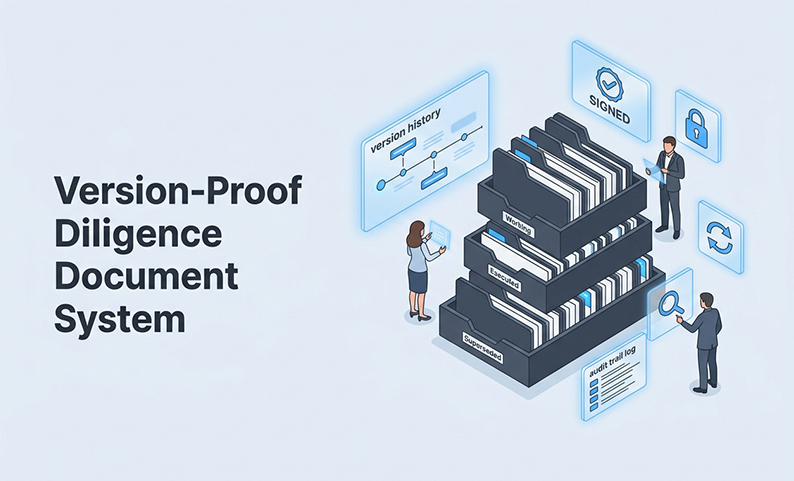
Every diligence file requires a single, authoritative location. Drafts are held in a /Working subfolder. Once signed, the final version moves to /Executed and the draft folder is archived. Reviewers should only look to /Executed for governing documents.
What to do with email attachments and local downloads
Email attachments and local downloads are read-only references, never working files. The data room is always the official source. If a document is not in the data room, it is not official.
2) Use a folder hierarchy that matches how reviewers browse (not how teams store)
A recommended top-level structure (simple, repeatable)
Organize folders by diligence workstream, not internal team structures. This aligns with how legal, finance, and HR reviewers operate.
01_Corporate
02_Financial
03_Legal_Contracts
04_IP
05_HR_Employment
└── /Working
└── /Executed
└── /Amendments_Exhibits
Where amendments, exhibits, and side letters should live
Place amendments in an /Amendments_Exhibits subfolder alongside the master agreement, referencing the parent document in the file name. This ensures all related documents are found in a single location.
3) Standardize file names to encode status + date (so “final” means something)
A naming formula (fields + order) teams can adopt immediately
Use this pattern consistently: [DocType]_[Party]_[Subject]_[Status]_[YYYY-MM-DD].
Placing the date last ensures alphabetical sorting matches chronological order. Status labels must be operational.
Status rules: Draft vs Final vs Signed vs Amended (and when each is allowed)
| Status | Meaning | Who Can Apply It |
| DRAFT | Under active revision | Deal lead or assigned uploader |
| FINAL | Agreed, not yet executed | Deal lead only |
| SIGNED | Fully executed | Deal lead only |
| AMENDED | Post-signing modification | Deal lead only |
Restricting who can apply FINAL or SIGNED status eliminates the _final_FINAL_v3 problem.
4) Run an update workflow: publish, replace, retire (every time)
The “replace + retire” rule (never upload duplicates)
When updating a document, upload the new version and immediately move the prior version to a /Superseded archive folder. Two versions of the same document should never coexist in active folders.
How to announce updates without blast-email chaos
Announce updates using the data room’s notification system. Platform notifications are logged, tied to the file, and do not generate insecure reply threads. A VDR like DCirrus uses its notification system and AI-powered search to make new versions instantly findable.
5) Lock down access to prevent stale drafts and uncontrolled sharing
Role-based permissions by folder/file (who can upload, who can view-only)
Permissions prevent stale drafts from circulating. Define roles and privileges clearly.
Teach-first product mention: how DCirrus enforces controls with DRM + granular permissions + audit trails
Permissions dictate who accesses a file. Digital Rights Management (DRM) defines what they can do with it. A platform like DCirrus VDR enforces both, letting you set file-level access controls, disable printing or copying, and track every action in an audit trail.
6) Tie Q&A to the right document version (so answers don’t go stale)
The rule: every answer links back to a specific file/version
Answers in the Q&A log must reference a specific file version, including its status and date stamp. See Section 4.2 of MSA_TargetCo_ServiceAgreement_SIGNED_2024-11-20 is traceable. “See the MSA” is not.
Teach-first product mention: DCirrus integrated Q&A + notifications inside the data room
Keep communications within the secure data room. Tools like DCirrus offer integrated Q&A where questions are tied directly to document versions. When a document is updated, related Q&A threads can be flagged for review to maintain traceability.
7) Make it stick: responsibilities + a quick “version confusion” scorecard
A simple responsibility matrix (who owns taxonomy, updates, permissions)
| Function | Taxonomy Owner | Upload/Replace | Permissions | Q&A Coordination |
| Deal Lead | ✓ | ✓ | ✓ | ✓ |
| Associates | — | Drafts only | — | — |
| IT/Finance | — | Own category | — | — |
Assign one deal lead as the system owner. Track weekly signals of version confusion: “latest version” requests and duplicate files. As these metrics approach zero, the system is working.
Comparison: Shared drives vs generic cloud folders vs a VDR for version control
The tool you use determines which rules are enforceable.
| Capability | Shared Drive | Generic Cloud | Dedicated VDR (e.g., DCirrus) |
| Version control | Basic (manual) | Basic (file history) | Built-in, enforced, auditable |
| Granular permissions | Folder-level only | Limited roles | File/folder/user level |
| DRM (disable print/copy) | Not available | Not available | Full DRM controls |
| Audit trail | Partial | Minimal | Comprehensive, exportable |
| Q&A management | External tools | External tools | Native, version-linked |
| AI search across documents | Limited | Limited | Smart indexing |
Generic cloud storage and shared drives are not designed for live deal environments where version control, DRM, and auditability are non-negotiable.
Summary and Next Steps
Version confusion is a system design problem with a system design solution. The fix requires one authoritative location, four defined statuses, a consistent naming formula, a replace-and-retire update rule, and strict access controls. The highest-impact action is to implement the naming convention and status rules in your active deal. If enforcement is a gap, a dedicated VDR is the logical next step.
FAQ
What folder structure works best for M&A due diligence when multiple parties are uploading files? Organize by workstream first (Legal, Financial), then by status (Working, Executed). Restrict upload permissions to designated leads per category to prevent duplicates.
How do I prevent “final_final_v3” naming and enforce a single latest version? Define a limited set of statuses like DRAFT, FINAL, and SIGNED. Restrict who can apply the FINAL label and mandate date-stamped file names. FINAL becomes a controlled designation, not a subjective one.
What’s the best way to handle amendments and restatements without confusing reviewers? Place amendments in a dedicated subfolder within the master document’s folder. Name the amendment file to clearly reference its parent document.
How do we manage document updates during live diligence without sending constant email blasts? Use your data room’s built-in, auditable notification system. This prevents the creation of insecure offline copies via email attachments.
How can we align different departments (legal, HR, finance) on one diligence document standard? Appoint a single deal lead as the system owner with authority over structure and naming. Enforce rules with permissions, not requests.
What should I look for in a VDR if version control and audit trails are my top priorities? Prioritize automated version history, granular audit trails for every user action, and DRM controls. Native Q&A that links directly to document versions is also critical for traceability.
Want to Eliminate Version Chaos in Your Next Deal?
DCirrus VDR is built for live deals with multiple parties, thousands of files, and zero tolerance for version confusion. The platform provides granular permissions, DRM controls, AI-powered document search, and comprehensive audit trails.
Book a free demo to see how this framework is enforced and review the platform’s capabilities in a live environment.
Latest Posts
Buyer Engagement Analytics in a VDR: What Deal Teams Can Track
August 17, 2026
12 VDR Features Required for IPO Preparation in India
August 13, 2026
What Bankers and Auditors Need From an IPO VDR in India
August 12, 2026