A Merchant Banker’s Framework for Structuring VDR Roles in a Multi-Bidder M&A
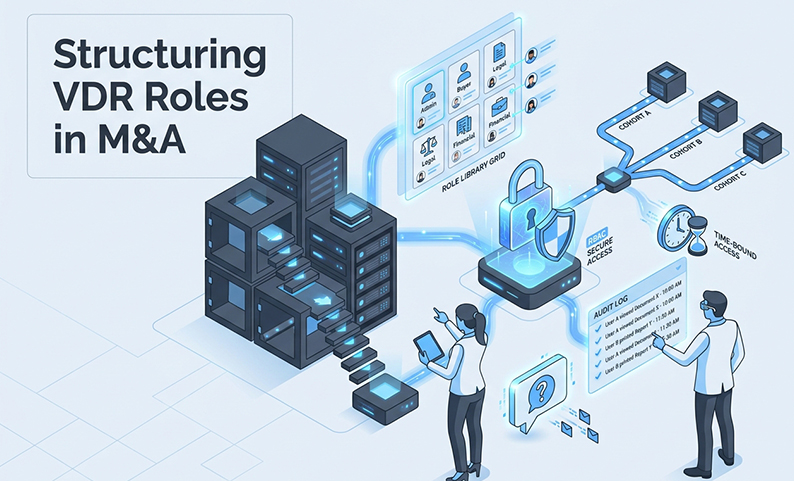
In a multi-bidder M&A process, generic VDR permissioning fails. The principle of “least privilege” is an insufficient guide for a dynamic environment where bidders enter and exit, advisors require temporary access, and internal teams need segregated duties.
Your VDR must function as a deal control system. It must evolve by phase, isolate bidders, manage exceptions without creating permanent risk, and produce a complete audit trail on demand.
This article provides a practical, seven-point framework to build that system.
The core problem: multi-bidder diligence breaks “standard” permissions
A static role hierarchy designed for a single buyer disintegrates under competitive pressure. Bidders drop out, new advisors join late, and specialists need temporary access to a single folder. The internal team needs to upload but never download. All of this occurs across parties who must remain isolated from one another.
The result is a predictable loss of control. Analysts create one-off roles, permissions sprawl, and by the LOI stage, no one can state with confidence who has access to what.
What “good” looks like in a competitive process
A well-governed multi-bidder VDR has four measurable properties. First, bidder isolation is structural. No user in Bidder A’s cohort can see Bidder B’s activity, Q&A, or permissions. Second, access follows the least privilege model at every phase. Third, the audit trail is complete and exportable. Fourth, analysts manage permissions from a standard role library, not by building custom configurations.
Frame the solution: a phase-based RBAC model (not a static role list)
Most teams treat role setup as a one-time configuration, patching roles as the deal evolves. This is a mistake. What begins as a clean structure becomes a patchwork of exceptions by the time an LOI is signed.
A phase-based RBAC model treats roles as living controls. What a bidder lead can access in the CIM phase is deliberately narrower than what they access in confirmatory diligence. Access expands and contracts at defined deal milestones, not just on request.
Three design principles: least privilege, bidder isolation, and operational simplicity
Every permission decision must pass through three filters. Least privilege: grant only what the current deal phase requires. If a bidder has not submitted an IOI, they do not see financials. Bidder isolation: roles are always cohort-scoped. A “Bidder Legal” role exists within Bidder A’s group and is never shared with Bidder B. Operational simplicity: your role library must be small enough for an analyst to apply without a decision tree. More than eight base roles indicates an overcomplicated design.
Where role explosion starts (and how this framework prevents it)
Role explosion begins when teams create bidder-specific custom roles. The correct approach is to apply a standard role to a bidder-specific group. This separates the role, which defines what a user can do, from the cohort, which defines the bidder they belong to. A “Bidder Legal” role can be assigned to legal groups for Bidder A, B, and C. This uses the same role, but with a different data scope for each group.
The banker’s 7-point checklist for VDR role design (use this on every deal)
1) Start with a role library (your default set)
Eight roles cover most multi-bidder processes.
Apply this library at deal kick-off. Assign users to roles and assign roles to cohorts.
2) Separate by bidder cohort before you customize permissions
Before adjusting file-level permissions, create a group for each bidder. Every user in that group inherits the folder access defined for their cohort. This structural separation ensures that when Bidder C drops out, you revoke access at the group level. This is a single action for complete revocation, requiring no individual user cleanup.
3) Decide folder-level vs file-level permissions using fast rules
Default to folder-level permissions. They are easier to govern and audit. File-level permissions are for exceptions. Use them only when a specific document within an open folder must be restricted, a sensitive file needs different permissions than its parent folder, or temporary access to a single file is being granted. Documents often requiring this control include post-IOI audited financials, IP assignments, and key customer contracts.
4) Add role constraints and hierarchies (separation of duties)
Two constraints are non-negotiable. First, no bidder role should have upload or delete rights. Second, Q&A must be strictly governed. Keep all deal communications inside the VDR to create a complete, searchable record and eliminate the risk of misdirected emails. Only Bidder Lead roles should initiate questions, and only Sell-Side Admin roles should assign and answer them.
5) Design for deal phases (time-bound access by milestone)
Map access expansion to deal milestones.
At each transition, run a permission review before expanding access.
6) Build in temporary/just-in-time access (without permanent exceptions)
Every exception request must follow a controlled four-step flow. Request: The bidder lead submits a written request specifying the user, file, and duration. Approve: The deal lead signs off. Grant: Provide time-boxed access, typically for 24–72 hours. Revoke: Confirm automatic expiry and log the exception. Downloaded files can be set to expire, with printing and copying blocked at the document level, to ensure a temporary file does not become a permanent leak.
7) Make auditability and monitoring part of the permission design
Audit trails are an early-warning system. Configure the VDR to log every view, download, print attempt, and permission change. Review logs daily during active diligence. Signals that warrant investigation include bulk downloads by a Bidder Team role, access from an unfamiliar IP, or a user viewing folders outside their scope.
Implementation: who owns what (so analysts aren’t the helpdesk)
A simple RACI for permissions, exceptions, and Q&A
| Task | Deal Lead | Analyst | Legal | Client |
| Role library setup | A | R | C | I |
| New user provisioning | A | R | I | I |
| Exception approvals | R/A | I | C | I |
| Q&A assignment | A | R | C | I |
| Bidder dropout revocation | A | R | I | I |
| Audit export | R | A | C | I |
R = Responsible, A = Accountable, C = Consulted, I = Informed.
Daily/weekly operating cadence
Daily: Verify no access request is over 24 hours old, confirm temporary grants have expired, and check for new device approvals. Weekly: Run a permission review against the current deal phase, revoke outdated access, and export the audit log. At each phase transition: Run a full role audit before expanding access.
Common failure modes (and how to catch them early)
Privilege creep during phase transitions
The most common failure is not retracting access after a bidder drops out. Treat phase transitions as mandatory revocation checkpoints. Before unlocking the next stage, run a report of all active users and explicitly revoke access for anyone no longer in the process.
Accidental cross-bidder leakage through folders, Q&A, or mislabeled roles
This is a structural configuration issue. Catch it before the room goes live with a two-person review. One person maps every role to its intended bidder cohort. A second person independently logs in as a test user for each cohort to verify that no folder, user, or Q&A thread from another cohort is visible.
Downloads becoming the real data leak
View-only controls stop casual oversharing, but not a determined user. The most effective controls are DRM-enforced file expiry, print blocking, and copy restrictions. For ultimate accountability, dynamic watermarking embeds the user’s login, IP, and timestamp on every downloaded page, creating a clear trail back to the source.
Connect to broader strategy: zero-trust + metrics that prove it’s working
Zero-trust behaviors in a VDR context
Zero-trust in a VDR means verifying before granting access (MFA, device approval), granting minimum necessary access (role library, least privilege), and verifying continuously (audit log review). This requires MFA for all external users, device-level approval, and IP restrictions where possible.
Metrics to track (security, speed, and workload)
A well-designed permissions model produces measurable outcomes. Track permission tickets per week, which should decrease over time. Track exceptions granted vs. expired on schedule; a high ratio of non-expiring exceptions indicates process failure. Track time to produce an audit export, which should be under 30 minutes. Finally, track Q&A response turnaround time.
Summary and Next Steps
In a multi-bidder process, permissions governance is deal governance. A static role list creates privilege creep and audit liability. A phase-based model, built on a small role library and bidder cohort isolation, gives you control.
Apply the seven-point checklist on your next deal. Assign a single owner for permissions and run the daily cadence without exception. This framework exists to prevent mistakes, not to document them after they occur.
FAQ
When should I use file-level permissions instead of folder-level permissions in a VDR? Default to folder-level permissions. Use file-level only when a document within an accessible folder needs tighter restrictions, typically for selectively disclosed financials, key contracts, or IP-sensitive materials. It is also appropriate for just-in-time access grants to a single document.
How do you avoid role explosion when each bidder has different advisors and workstreams? Separate the role from the cohort. Define a small set of standard roles with fixed permissions, then assign those roles to bidder-specific groups. The cohort structure controls what data a group sees, not a bespoke role.
What’s the best way to handle just-in-time or 48-hour access requests during diligence? Use a four-step flow: written request from the bidder lead, deal lead approval, a time-boxed grant (24–72 hours), and automatic expiry that is confirmed and logged. Combine this with DRM controls like file expiry and print blocking.
How should VDR roles change from initial diligence to confirmatory diligence? Access expands at each milestone, but only for parties still in the process. Post-IOI, financial and operational folders open. Confirmatory diligence unlocks the full room for the single shortlisted party. All other bidders should have their access fully revoked.
What should I look for in VDR audit logs to spot suspicious behavior early? Watch for bulk downloads, access to folders outside a user’s assigned cohort, activity from unrecognized IP addresses, and print attempts on restricted documents. Any of these signals warrants an immediate configuration check.
How do you keep bidder Q&A isolated and auditable in a multi-bidder process? Q&A threads must be bidder-siloed at the configuration level. No bidder should see another’s questions or answers. Only Bidder Lead roles should initiate questions, and only Sell-Side Admin roles should respond. Keep all communications inside the VDR’s Q&A system for a complete, auditable record.
Want tighter bidder separation and less permission firefighting on your next deal?
DCirrus VDR supports the full framework described here. The platform includes folder and file-level role permissions, DRM controls on downloaded documents, comprehensive audit trails, and an integrated Q&A module designed for multi-bidder governance. Book a free demo to see how the platform handles a live deal configuration.
Latest Posts

Buyer Engagement Analytics in a VDR: What Deal Teams Can Track
August 17, 2026

12 VDR Features Required for IPO Preparation in India
August 13, 2026

What Bankers and Auditors Need From an IPO VDR in India
August 12, 2026