Establishing the Initial Chain of Custody_ A Framework for an Auditable Third-Party Document Collection
You’re three weeks into a deal when a PDF arrives by email: “updated version.” No credentials, no version number, no verifiable timestamp. You add it to the deal folder, and your audit trail now has a permanent gap.
This isn’t a storage problem. It’s an intake problem. Chain of custody begins the moment a document enters your workflow, or it doesn’t exist. You can’t fix a submission that arrived without a clear identity, integrity check, and logged handoff after the fact. This article provides a framework for getting that first mile right.
Why “we’ll clean it up later” breaks auditability (and wastes deal time)
The instinct to triage now and organize later is understandable. But you cannot create a chain of custody after the fact. It’s either captured in the moment or it’s lost for good.
What “initial chain of custody” means in a deal context
In a deal context, this means having a permanent, unchangeable record of who submitted a document, when it entered your system, its condition on receipt, and every person who touched it since.
The solution: a first-mile inbound custody framework
A solid framework focuses on four proofs at intake: identity, integrity, logging, and controlled handoffs. Because email and file shares can’t provide this, you need a purpose-built system. A Virtual Data Room (VDR) like DCirrus VDR offers this foundation. It uses granular permissions and comprehensive audit trails to log all activity and restrict access by role, which eliminates the risks of using email.
The 4 Proofs You Need from Day One: Who, What, When, and What Changed
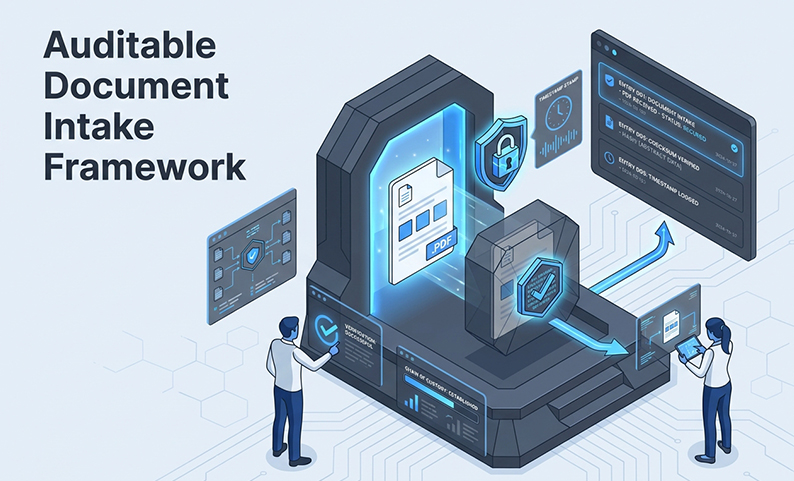
At the moment of receipt, every submission must clearly answer four questions: – Who: An authenticated submitter tied to a specific entity. – What: The document type, version, and its corresponding deal phase. – When: A system-generated timestamp, not a file’s metadata date. – What changed: A checksum or version ID to detect any tampering.
If any of these are missing, your custody trail has a gap.
The 6-Step Framework to Establish Initial Chain of Custody for Third-Party Submissions
This framework creates an auditable record from the very first touchpoint. A clean intake process enables faster reviews. Tools like DCirrus VDR’s AI-powered indexing and search can help teams find information quickly, but they are only effective if the underlying custody of the documents is sound.
1) Set the Custody Start Line
Define a single submission portal and forbid other channels like email. Require all submitters to authenticate with role-based access and 2FA before uploading. This traces every submission back to a verified identity.
2) Capture Submission Identity and Context at the Point of Receipt
Your system must automatically log the submitter’s name, organization, a system-generated timestamp, document type, and the associated deal phase. A structured intake portal does this automatically.
3) Validate Integrity on Receipt
Assume any document can be silently replaced. Assign a unique version ID or checksum upon upload. A new version gets a new record; it never overwrites the original.
4) Log Every Handoff Event
Receipt, triage, and review are separate events that must be logged. At a minimum, log the timestamp, actor, action, and version ID for each handoff. Acknowledgment is the system recording that a user has accepted responsibility for the next step.
5) Enforce Access Controls During Intake and Review
Apply the principle of least privilege so reviewers can only access relevant documents. Use a VDR’s DRM controls (to restrict printing and copying) and dynamic watermarking (which adds a user ID, IP, and timestamp). These features reduce leakage risk and create a clear evidence trail.
6) Control Versions and Updates
An “updated version” never replaces the original. It becomes a new, separate version with its own submission event. The prior version is preserved and locked. This is the only way to handle resubmissions without breaking custody.
Who owns what: a simple responsibility matrix for inbound document custody
Roles to Define: Deal Owner, Intake Owner, Reviewer, and More
| Role | Responsibility |
| Deal Owner | Owns intake policy, approves submitters |
| Intake Owner | Validates submissions, flags exceptions |
| Reviewer | Conducts review on assigned documents |
| Approver | Signs off on completeness at each phase |
| Auditor | Audits logs for gaps and escalates |
Accountability That Works: SLAs, Reminders, and Escalations
Attach service level agreements (SLAs) to handoff events. If a document sits unacknowledged, the system should automate a reminder, followed by an escalation. Tracking completion rates by role helps you spot bottlenecks before they become critical problems.
Common custody failures (and how to detect and contain them early)
Red Flags: Signs Your Custody Is Broken
Immediate Containment Checklist
Making it sustainable: cross-border realities and workflow automation
Cross-Border Intake: Data Residency and Access
When third parties are in different countries, data residency rules may require servers to be in specific locations. A VDR with data localization options and device-level 2FA approval, like DCirrus VDR, can meet these rules without forcing you to create separate, complicated processes.
Automate Carefully: What to Automate and What to Log
Automate simple things like reminders and log entries. Do not automate approvals or version promotions. Any action that requires human judgment must be a logged human event to be defensible in an audit.
Summary and Next Steps: start custody at intake, not in hindsight
The priority is simple: set the custody start line before the first document arrives. Define one intake channel, authenticate every submitter, and make sure your system logs each event automatically. Get that first moment right, and your entire audit trail will have a solid foundation.
Ready to Make Your Due Diligence Intake Audit-Ready?
Book a free demo of DCirrus VDR to see how granular permissions, DRM controls, dynamic watermarking, AI document intelligence, and comprehensive audit trails work together to establish a defensible chain of custody from the moment the first document arrives.
FAQ
What’s the minimum information we should capture when a third party submits a document? Capture the submitter’s authenticated identity, organization, a system-generated submission timestamp, document type, and a version ID or checksum. These five fields provide enough information to reconstruct custody if it’s ever challenged.
How do we prove a document wasn’t replaced or altered after submission? Assign a checksum or version hash at upload and lock the original file. Any later submission of the same document must create a new record instead of overwriting the original. Your audit log will then show both versions with separate intake events.
What’s the best way to handle resubmissions without losing custody history? Treat every resubmission as a new intake event. Mark the latest version as current, but preserve all prior versions with their original submission records intact. Never allow a resubmission to replace or delete a prior entry.
How do we manage chain of custody when third parties are in different countries? Match your intake channel and data storage to the most restrictive jurisdiction involved. Use a VDR with data localization options so documents from EU parties can be stored on EU servers. Apply access restrictions by geography or IP range where needed.
What should we do if someone sends documents outside the approved intake channel? Do not file the document. Flag it. Notify the submitter immediately with the correct channel instructions and log the off-channel attempt. If the document is sensitive, treat it as a potential custody breach and follow your containment checklist.
What are the early warning signs that our inbound document workflow isn’t audit-ready? The clearest signs are documents arriving by email, version numbers that don’t match your log, reviewers working from files not recorded in the system, and gaps between submission timestamps and the first logged access. Any one of these signals a break in your chain of custody.
Latest Posts

Buyer Engagement Analytics in a VDR: What Deal Teams Can Track
August 17, 2026
12 VDR Features Required for IPO Preparation in India
August 13, 2026
What Bankers and Auditors Need From an IPO VDR in India
August 12, 2026