Preventing Permission Creep_ Applying the Principle of Least Privilege in Your IPO Data Room
Your DRHP filing deadline is six weeks out. An auditor needs urgent access to financial statements. You grant it broad access with no expiry. Three weeks later, that auditor still has visibility into sections of the data room they never needed. This is how IPO data rooms leak. Permission creep, the gradual accumulation of access rights beyond what stakeholders require, is a potent deal risk born from speed and the absence of a governed workflow. The Principle of Least Privilege (PoLP) is the solution, but only when it operates as a living process, not a one-time configuration.
What Is Permission Creep and Where It Starts
Permission creep happens when access granted for a specific purpose, person, or phase persists beyond its intended scope. In the high-pressure environment of IPO diligence, this is an operational failure, not a malicious act.
The most common IPO triggers for access creep
Access sprawl is triggered by rational shortcuts under tight deadlines. A banker adds an entire team to a folder instead of specific files. An admin copies a user profile to onboard an advisor quickly, carrying over excessive permissions. “Temporary” access granted for a single task is never revoked. Each action expands the blast radius of a potential breach or leak.
The Material Risks of Unchecked Access
In an IPO, overprivileged access creates direct regulatory and commercial exposure. Undocumented data room access raises questions about selective disclosure and insider trading risk during SEBI’s ICDR review.
The hidden cost: faster diligence vs. uncontrolled access sprawl
The instinct is to widen access to remove friction for advisors. The consequence is a data room where external parties hold permissions that were never formally reviewed or revoked. When counsel asks who accessed confidential financials during the pre-DRHP phase, “we’re not sure” is not an acceptable answer.
Applying Least Privilege: A Workflow for IPO Diligence
Least privilege access (LPA) only works when structured as a repeatable workflow across each diligence phase: pre-DRHP, filing, Q&A cycles, and roadshow.
Step 1 — Define roles and “need-to-know” by diligence phase
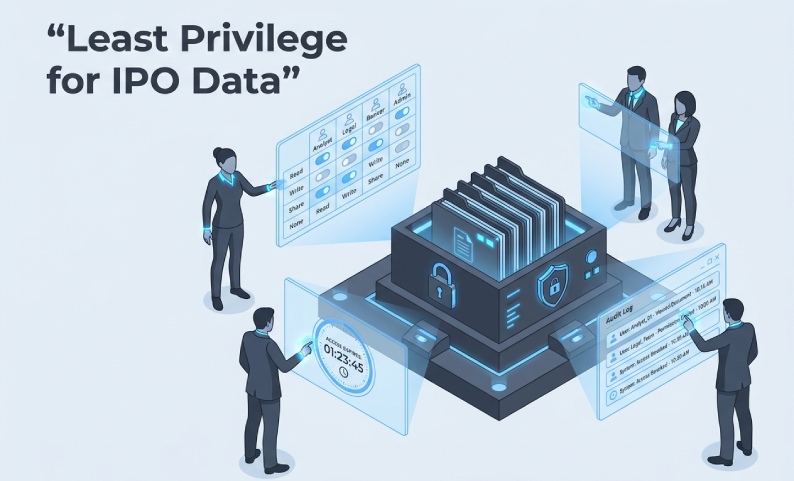
Before onboarding anyone, map roles to specific folder sets, time windows, and permission levels. Legal counsel needs legal documents, not financial models. This mapping becomes your governance playbook for every access request.
Step 2 — Use RBAC + time-bound (JIT) access for elevated needs
Role-based access control (RBAC) provides the baseline. Just-in-time (JIT) access handles exceptions. When an auditor needs to upload schedules, grant upload rights for 48 hours, not indefinitely. Any elevated permission, like download rights, must have a defined expiry date.
Step 3 — Separate admin actions from day-to-day user access
Limit who can invite users, reassign roles, or modify permissions to a small set of deal ops leads. This requires a formal approval workflow for all permission changes to reduce the risk of human error. Standard users should never have admin-level rights.
Enforcing least privilege at IPO speed
Enforcing this model requires a purpose-built platform. DCirrus VDR supports role-based access at the folder and file level, combined with device-level approval, IP address restrictions, and two-factor authentication. This ensures only the right person, from the right device and location, accesses the right document at the right time.
Minimum Viable Audit Trails for IPO Scrutiny
A governance posture without logs is a policy, not a control. Your audit trail must be reconstructable on demand to stand up to scrutiny.
Audit trail checklist (access events + permission changes + downloads + Q&A)
| Event Type | What to Log |
| Document access | User ID, timestamp, document name, IP address |
| File download/print | User ID, timestamp, device, file name |
| Permission changes | Admin who changed, what was changed, user affected |
| Q&A interactions | User identity, question/response, timestamp |
| User onboarding/offboarding | Invite date, access granted, revocation date |
What to review weekly vs. at key milestones
Run a weekly access review to revoke expired or unnecessary permissions. At major milestones like the DRHP submission, SEBI observation, and roadshow launch, conduct a full audit to ensure all access remains valid.
Watermarking + comprehensive audit trails
DCirrus’s dynamic watermarking applies user login info, IP address, and a timestamp to every document. This deters redistribution and creates a documented chain of custody. Combined with comprehensive activity logs, it provides the evidentiary foundation a governance review requires.
A Practical Role-to-Folder Permission Matrix
Table: Common IPO roles vs. access levels by folder type
| Role | Financial Statements | Legal & Contracts | HR & Org | Regulatory Filings | Q&A Access |
| Merchant Banker (lead) | View + Download | View + Download | View | View + Upload | Full |
| Issuer (CFO/CS) | View + Upload | View + Upload | View + Upload | View + Upload | Full |
| Legal Counsel | View | View + Download | View | View | Respond |
| Statutory Auditor | View + Download | View | None | View | Submit |
| Underwriter | View + Download | View | None | View + Download | Submit |
| Registrar (RTA) | None | None | View | View + Upload | None |
| External Vendor | None | None | None | Upload Only (scoped) | None |
Third-party/vendor access rules
For vendors, scope access to the single folder required, set a hard expiry date at the time of invite, and execute a documented access revocation immediately upon task completion.
Balancing Control and Diligence Speed
Strict controls fail when they create enough friction to push teams toward workarounds, most often email.
Replace “email-based exceptions” with controlled collaboration
When an advisor cannot get clarification inside the data room, they will send an email, often attaching the document. That file is now outside your governed environment. The solution is not looser permissions; it is a richer collaboration environment inside the VDR. DCirrus’s integrated Q&A forums and secure messaging give teams the tools to resolve queries without leaving the platform, keeping collaboration inside the governed perimeter.
Key Performance Indicators and Vendor Due Diligence
KPIs that signal permission creep early
Vendor evaluation questions
Can you set automatic permission expiry at the folder and file level? Can you restrict access by device ID and IP range? Does your audit log export include permission change history? Can you revoke access to downloaded files?
Visualizing and Tracking Permission Creep
Visualizing permission creep makes the risk tangible. Track KPIs like the number of users with elevated access by week. Chart the access distribution by stakeholder group to see how risk concentrates with external parties. For market context on IPO data governance, practitioners can reference sources like PitchBook, Mergermarket, GF Data, and Grata.
Ready to lock down IPO data room access without slowing diligence?
Permission creep accumulates through rushed invites and temporary access that is never revoked. This continues until a regulator asks who accessed your pre-DRHP financials and your logs cannot provide an answer.
DCirrus VDR is built to enforce least privilege at IPO speed with granular permissions, time-bound access, device-level controls, dynamic watermarking, and complete audit trails designed for SEBI scrutiny.
Request a demo to see how DCirrus implements this framework for live IPO transactions.
Latest Posts

Buyer Engagement Analytics in a VDR: What Deal Teams Can Track
August 17, 2026

12 VDR Features Required for IPO Preparation in India
August 13, 2026

What Bankers and Auditors Need From an IPO VDR in India
August 12, 2026