Buyer Engagement Analytics in a VDR: What Deal Teams Can Track
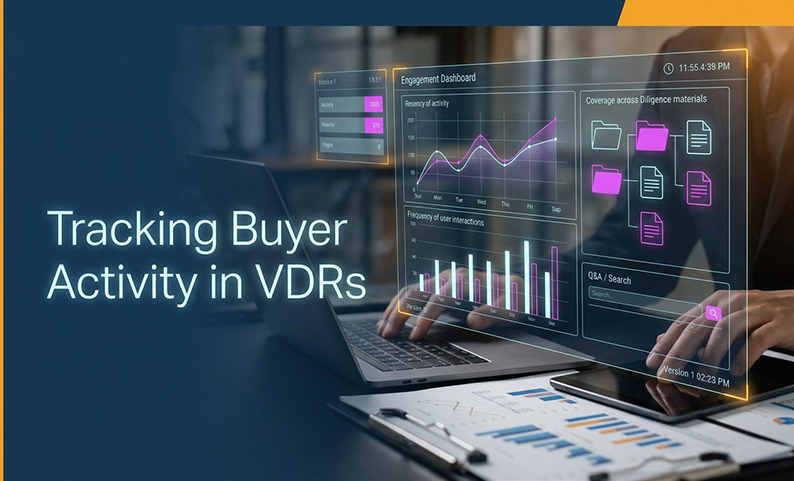
When a deal is moving fast, the hard part is not getting documents into the room. It is knowing what external parties are actually doing with them. Without that visibility, teams waste time on guesswork: a revised model sits untouched, questions age out, and follow-up turns into a chain of manual emails.
That is where VDR analytics helps. Used correctly, it gives deal teams an activity-to-action framework: attributable events, cautious interpretation, and a documented next step. In this article, I’ll break down what real-time buyer engagement analytics can realistically show, how model viewing tracking works in practice, and the reporting signals that matter most in live transactions.
Why this framework is more useful than gut feel
A VDR is not trying to read minds. It is trying to preserve evidence of access, interaction, and workflow. That matters because a merchant banker needs to know who saw what, when they saw it, how often they returned, and whether a critical workstream is still quiet.
The useful distinction is simple:
- Operational visibility tells you where attention is going.
- Buyer intent is still a guess unless the counterparty says it directly.
That is why real-time buyer engagement analytics should be treated as a decision support layer, not a prediction engine. The best reporting focuses on attributable activity, version context, Q&A, searches, and coverage. It then converts those signals into a follow-up action, rather than a claim about who will bid.
1. Define the decision before you measure engagement
Before you look at charts, decide what you are trying to answer. Otherwise, the report becomes noise.
A good analytics question is specific:
- Which bidder needs a follow-up on the revised model?
- Which diligence category has not been touched?
- Which question has gone stale?
- Which group still cannot access the right files?
To make VDR analytics useful, set the scope first:
- Define the population: legal counsel, auditor, buyer group, legal counsel, auditor, underwriter, issuer team, or all users.
- Define the period: since launch, last day, last seven days, last month, or a custom range.
- Define the owner for the follow-up.
- Record the due date for the next action.
- Avoid invented thresholds that pretend to be industry standards.
This is where model viewing tracking becomes practical. You are not asking whether the model was “understood.” You are asking whether the model file, or a version of it, was accessed and whether that access needs a response.
2. Make every activity attributable
A report is only useful if you can connect the action to a real person and context.
Strong identity and session context can include:
- Named user rather than a shared login
- Role, company, group, or party affiliation
- Login and logout activity
- IP address and device context
- Time stamp with a stated time zone
- Successful and failed login attempts, where the platform logs them
For merchant bankers, this is not a nice-to-have. It is the base layer for auditability and compliance. If you cannot tell who did what, the rest of the reporting is weak.
Practical checks:
- Require individual accounts.
- Use MFA where policy permits.
- Consider device approval and IP restrictions for sensitive workstreams.
- Restrict audit-log access to authorized administrators and counsel.
- Standardize the time zone in reports.
This is also where real-time buyer engagement analytics needs a reality check. “Real time” can mean different things by vendor and report. Some platforms update continuously, some on a schedule, and some only after report generation.
3. Track document and version activity, not just clicks
A click is only meaningful if you know which file and version it involved.
Useful document activity can include:
- View or access
- Download, save, or bulk download
- Print and copy, where supported
- Upload, delete, add version, edit, or move
- Permission changes
- Sharing activity, where exposed by the platform
A document-access report may be scoped by individual document, group, subgroup, or individual user. A document-history report is different. It reconstructs additions, permission changes, updates, moves, and deletion.
For model viewing tracking, the useful approach is to treat the financial model as a controlled set of reportable files or folders:
- Main model
- Assumptions
- Sensitivity analysis
- Valuation
- Supporting schedules
That gives the team cleaner visibility when a revised model is uploaded or a specific file gets repeated attention.
What to check:
- Stable file names
- Unique identifiers
- Version numbers
- Whether deleted files and prior versions remain visible in reports
- Whether the report captures the release time of a revised file
This is the difference between a dashboard snapshot and defensible evidence.
4. Read coverage, recency, frequency, and depth together
The strongest engagement signals are patterns, not isolated events.
Here is the practical meaning of the main dimensions:
- Coverage: which files or folders were touched, and which were not
- Recency: the latest access date
- Frequency: repeated interactions over a defined period
- Depth: viewing duration or page-level time, only where the provider documents it
- Breadth: how many folders, files, or diligence categories were accessed
- Concentration: the most-active documents or categories
This is where VDR analytics becomes genuinely useful for deal teams. It helps answer operational questions such as:
- Is the revised model being revisited?
- Is one diligence stream getting all the attention?
- Did a key folder go untouched after release?
- Are several parties concentrated in the same document set?
But the limits matter just as much:
- A download is not proof of understanding.
- A high view count is not proof of conviction.
- Low activity is not proof of disinterest.
Use real-time buyer engagement analytics to prioritize follow-up, not to label a buyer. If a critical folder is untouched, the right next step is to check access, permission, and content completeness.
5. Use Q&A and search activity as part of the same picture
Document activity alone can mislead. A team may be searching hard and asking questions even if file views look modest.
Useful signals include:
- Questions submitted
- Questions viewed
- Answers viewed
- Question status and age
- Ownership
- Search-summary activity or full-text search where available
This is especially important in live transactions. If the same topic keeps surfacing in Q&A, the team should treat that as a workstream issue, not a random side note.
Practical actions:
- Keep material Q&A inside the VDR rather than in scattered email threads.
- Link each question to the relevant document and version.
- Use aged-question reporting to prioritize unanswered items.
- Review search terms to see what users are trying to locate.
This is one of the best uses of VDR analytics because it connects demand for information with the actual files and questions driving it.
6. Choose the right report cadence and preserve the evidence
A dashboard is helpful. An export is what you can defend later.
A serious reporting layer should answer four questions:
- Who acted?
- What did they access?
- When did it happen?
- What can the team do with the report?
Useful report forms include:
- Activity summaries
- Detailed activity logs
- Document-access reports
- Document-history reports
- Most-active document reports
- User and group reports
- Engagement matrices
- Q&A or aged-question reports
- Login reports
- Permission logs
- Search summaries
For merchant bankers, the reporting workflow should also preserve context:
- Raw export
- Field-definition note
- Filtered extract by workstream
- Report generation time
- Selected filters
- Time zone
One concrete example from the market: Intralinks’ User Activity by Group report is produced offline and is generally available within one hour. That is why “real time” should always be tested, not assumed.
For real-time buyer engagement analytics, ask the vendor exactly how the dashboard refreshes and whether the report is live, scheduled, or generated on demand.
7. Convert patterns into controlled actions, not predictions
Analytics should trigger a workflow, not a forecast.
Here is the right way to respond to common patterns:
- Untouched critical folder → verify permission and confirm scope
- Repeated model access after a revision → prepare a version-change summary
- Heavy Q&A in one topic → assign subject-matter coverage
- Unusual download, print, sharing, IP, or device event → follow the incident process
- Activity spike before a milestone → align the deal team’s availability
- Low activity → check login access, permissions, invitation status, and content completeness
This is the practical value of model viewing tracking. It tells the team when the financial model is being revisited, which version was involved, and whether the deal team should respond with a clarification or controlled Q&A.
What it does not tell you:
- Whether the buyer likes the asset
- Whether the buyer will bid
- Whether the buyer can finance the deal
- Whether the buyer has changed valuation
That is the line to keep clear.
8. Validate the analytics before you rely on them
A VDR demo should prove the reporting, not just describe it.
Test with real accounts and test files:
- Open a specific model version
- Download, print, copy, upload, edit, delete, move, and add a version
- Submit a question and view an answer
- Search for a term
- Confirm the event fields captured
- Confirm identity, group, file, version, action, date/time, time zone, IP or device context
- Check revoked access and expired access
- Verify alert behavior
- Verify export format and readable headers
Also ask the vendor to define:
- “View”
- “Time spent”
- “Engaged”
- “Real time”
That last point matters. Some products document viewing duration or page-level time, but not all do. In model viewing tracking, duration may depend on the provider, security settings, and report type.
How this fits into a merchant banker’s operating model
For SEBI-registered merchant bankers, the goal is not just visibility. It is control.
A workable responsibility split looks like this:
| Activity | Merchant banker deal lead | VDR administrator | Compliance/legal | IT/security | Issuer/client | External reviewers |
|---|---|---|---|---|---|---|
| Define groups and least-privilege access | A | R | C | C | C | I |
| Configure MFA, device/IP controls, watermarking | A | R | C | R | I | I |
| Upload, classify, and version documents | A | R | C | I | R | I |
| Approve analytics definitions and thresholds | A | R | R | C | C | I |
| Run daily or weekly activity and Q&A reviews | R | R | C | I | C | I |
| Investigate unusual access or sharing | A | R | R | R | I | C |
| Preserve and export audit evidence | A | R | R | C | I | I |
Use this structure to keep reporting narrow and useful. A buyer may see documents, but that does not mean they should see another bidder’s activity or the full audit export.
One concrete example from the market: SEBI-registered merchant bankers should build the process and evidence chain before launch to avoid last-minute issues.
Common mistakes that weaken VDR analytics
These failures show up often enough to plan for them.
- Calling every view “engagement.”
Fix: report raw events first, then define derived metrics. - Treating a download as comprehension.
Fix: pair it with repeat access, Q&A, and follow-up confirmation. - Comparing groups with unequal permissions or content.
Fix: normalize release dates, permissions, and time windows. - Using login time as reading time.
Fix: separate session duration from document-view duration. - Assuming real time means instant.
Fix: document the refresh cadence and test it. - Ignoring configuration dependencies.
Fix: check whether security settings or viewer behavior affect what gets tracked. - Overexposing reports.
Fix: restrict access to authorized deal leads, counsel, and administrators. - Failing to preserve context.
Fix: keep the original export, filters, time zone, and generation time.
This is also why VDR analytics should stay close to process, not personality. The more the team speculates about intent, the less disciplined the workflow becomes.
Why this matters beyond one deal
The real value of analytics is not a fancier dashboard. It is a repeatable operating habit.
Over time, a good reporting discipline helps teams:
- Spot missing access
- Catch stale questions earlier
- See which workstreams are active
- Tighten follow-up
- Preserve a cleaner audit trail
- Reduce email-driven guesswork
That is the right role for real-time buyer engagement analytics in a live transaction. It supports decision-making, helps the team move faster, and gives compliance a cleaner record. It does not replace judgment, and it should never be sold as a proxy for buyer intent.
Summary and Next Steps
Buyer engagement analytics in a VDR is about observable, attributable activity. The practical signals are document access, version activity, coverage, recency, frequency, Q&A, search behavior, and report context. Used well, VDR analytics gives a merchant banker a better way to prioritize follow-up and preserve evidence.
The high-priority takeaway is simple: define the decision first, then measure the activity that can support it. If you can track who accessed which version, when, how often, and in what context, you have something useful. If you start trying to infer intent, you are back to guessing.
FAQ
What does buyer engagement analytics in a VDR mean?
It means reporting on attributable user and group interactions with controlled deal content, such as views, downloads, searches, Q&A, recency, and coverage.
Can a VDR tell us which buyer is most interested?
It can show which buyer or group has more recorded activity under a defined metric and comparable permissions. It cannot prove intent, conviction, or whether that buyer will submit an offer.
What is model viewing tracking?
It is a practical label for tracking access to financial-model or model-related files. Whether the system records only access or also duration, pages, repeat views, or downloads depends on the platform and configuration.
Is VDR analytics real time?
Sometimes. Some vendors offer real-time dashboards or tracking, while other reports are generated offline. Ask for the refresh definition and test it in a demo.
Does a download mean the buyer reviewed the file?
No. It proves a recorded download or save event, not comprehension, agreement, or intent.
Can the team see time spent on a document?
Some products document viewing duration or page-level time, but it is not universal. Duration may also depend on security settings and report type.
Who should receive activity reports?
Usually the deal lead, VDR administrator, compliance or legal team, and designated issuer personnel on a need-to-know basis.
What should a VDR demo prove?
It should show identity, file and version, action, timestamp, time zone, group, permission, IP or device context where relevant, refresh behavior, export, alerting, and the exact definitions of view, duration, engaged, and real time.
Want clearer visibility into every deal-room interaction?
Book a free DCirrus demo to see how permissions, document activity, Q&A traceability, audit exports, and reporting controls work in a live transaction setting.
Latest Posts
Buyer Engagement Analytics in a VDR: What Deal Teams Can Track
August 17, 2026

12 VDR Features Required for IPO Preparation in India
August 13, 2026
What Bankers and Auditors Need From an IPO VDR in India
August 12, 2026

How a VDR Supports the India IPO Journey Step by Step
August 10, 2026