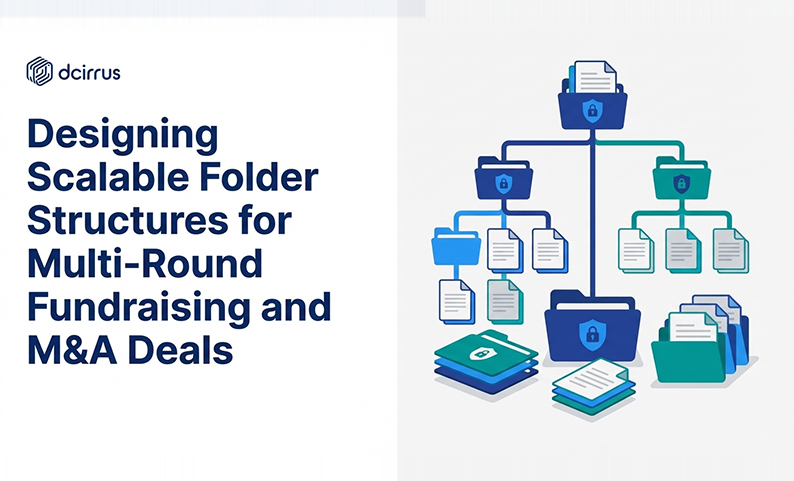
Designing Scalable Folder Structures for Multi-Round Fundraising and M&A Deals
If you’ve managed one financing or one acquisition, you already know the hard part isn’t just collecting due diligence documents. It’s keeping them organized as the deal evolves. In multi-stage fundraising and phased M&A transactions, the document set changes constantly: new board decks, updated financial models, revised contracts, refreshed cap tables and repeated investor requests.
A scalable folder structure (folder hierarchy, directory organization, folder architecture) keeps that motion from turning into confusion. Done well, it reduces duplicated files, improves investor navigation, supports clean permission settings and keeps you audit-ready without forcing your team to reorganize everything every round.
Using a secure virtual data room designed for multiple fundraising rounds helps enforce consistent folder hierarchies and robust access controls needed for complex deal workflows.
What makes multi-round document management so challenging?
Multi-round deals break simple folder setups because the “shape” of diligence changes over time. Common pressure points include:
- Document volume compounds across rounds (Series A materials don’t disappear in Series B; they become the baseline)
- Versions multiply fast when multiple stakeholders need to reference what was true at a specific date
- New stakeholders join midstream and each new investor group, lender or advisor adds access needs
- Different diligence lenses collide (fundraising emphasizes growth; M&A emphasizes risk and liabilities)
- Security and collaboration compete for priority
- Compliance expectations are ongoing. Retention, traceability and audit trails become more important the longer the cycle runs
The folder architecture must stay stable enough to be familiar and flexible enough to expand without rework. That’s the theory. In practice, it’s messier.
How to structure folder hierarchies that actually scale
A scalable folder hierarchy is less about the “perfect” tree and more about logic that survives change. The most durable approach? Standardize top-level folders and reserve flexibility for lower levels.
Setting up folder hierarchies by fundraising rounds and deal stages
For multi-stage fundraising, keep round-specific materials separate while preserving continuity. One practical pattern:
- 00_Admin
- 01CompanyOverview
- 02_Financials
- 03_Legal
- 04_Tax
- 05_Commercial
- 06ProductTech_IP
- 07_HR
- 08RiskCompliance
- 09QAReference
- 10RoundPackages
- 99_Archive
Make RoundPackages the place where round-specific snapshots live (SeriesA, SeriesB, M&AProcess). For phased M&A transactions, map stages the same way:
- M&AProcess01_Teaser
- M&AProcess02_LOI
- M&AProcess03_Diligence
- M&AProcess04_Definitives
This avoids reorganizing core categories every time the deal advances. Decide early whether a document “lives” in a core folder or in a round package. If you don’t decide, you’ll end up with the same model in three places.
Categorizing documents by type and sensitivity
Category organization makes the data room usable for investors, acquirers, counsel and auditors. Within each category split by type and sensitivity.
Common splits that stay readable:
- Financials: audited statements, management accounts, budgets, revenue detail, KPI reporting
- Legal: corporate structure, cap table, material contracts, litigation, board materials
- Tax: returns, assessments, transfer pricing, indirect tax filings
- IP/Tech: patents, source code policies, security posture, third-party licenses
- HR: org charts, key employment agreements, benefits, option plans (often tightly permissioned)
Sensitivity handling: add clear markers at the subfolder level without making the tree huge. LegalContractsStandard versus LegalContractsHighSensitivity. FinancialsForecastHighSensitivity. This makes it easier to apply granular user rights without file-by-file exceptions.
Folder naming conventions for clarity and consistency
Naming conventions make folder architecture scale when different people upload files over months. The goal? Predictable sorting and fast recognition.
A practical file naming pattern:
[Category]-[Subcategory]-[Entity]-[DocName]-[YYYY-MM-DD]-[Version]
Examples:
- FIN-MonthlyMgmt-Group-PnL-2026-01-31-v1
- LEG-Corporate-Parent-BoardMinutes-2026-01-10-v1
- MA-Definitives-Target-SPA-2026-03-01-v2
Folder naming should follow the same logic. Use numeric prefixes to lock ordering (00, 01, 02…), use singular meaning per folder (avoid “Misc,” “Other,” “New”), use dates for time-bound snapshots and use consistent casing and separators.
Define what “v1/v2” means early on. Reserve “v#” for controlled revisions and use an additional marker for audience when needed.
Balancing security and collaboration with granular access controls
A folder structure is also a security model. If folder boundaries don’t match how you intend to share, you’ll manage permissions file-by-file, which becomes brittle in sequential deal rounds.
Role-based permissions models
Start with roles you expect in every round then map them to access levels:
- Internal deal team: broad access; tighter controls on HR and certain legal items
- Legal counsel: full access to Legal; view access elsewhere
- Auditors: read access to Financials and Tax; controlled access to Legal
- Investors (current round): read access to curated set; limited downloads
- Strategic buyers: staged access that expands by phase
- Lenders: focus on financial covenants, debt schedules, cash flow
Design choices that help permission inheritance (keep high-sensitivity materials in their own subfolders, avoid mixing “internal working” files with “externally shared” files, create a dedicated Investor_Requests area).
Advanced permission management like device-level approval and IP restrictions adds control so that access decisions remain enforceable in real-world usage.
Security features: watermarking, device approval and audit trails
Folder architecture should anticipate how you’ll respond if something goes wrong. Security features work best when tied to the segmentation you already use.
Common controls to align with your hierarchy:
- Watermarking: apply stronger rules to high-sensitivity folders (forecasts, pricing, key contracts)
- Device approval: require approved devices for the most confidential files
- Audit trails: ensure every folder containing disclosure materials has robust logging
- Download restrictions: use for folders where leaks create the highest risk
Use folder boundaries to apply proportional controls without creating admin overload. Worth documenting this early.
Using AI and technology to optimize folder organization and search
Even the best directory organization can become slow when thousands of files accumulate. AI-powered indexing and document search optimization complement the folder hierarchy rather than replace it.
Integrating AI with folder hierarchies for faster due diligence
AI-powered indexing is most useful when your structure is consistent. If naming conventions and categories are stable AI can help by speeding retrieval through metadata search, improving discovery via automated categorization suggestions, supporting review workflows with clause recognition and reducing manual effort by identifying duplicates.
AI-powered indexing and metadata search can dramatically reduce time spent locating critical deal documents (enhancing folder design effectiveness during high-pressure due diligence).
Linking folder structures to Q&A and collaboration tools
Folder design should support how questions arrive and how answers are documented. Keep a single source folder for canonical documents. Maintain a controlled Q&A reference area for clarifications, response letters and updated exhibits.
Practical workflow: When an investor asks a question respond in the Q&A tool then link the answer to the relevant document location. If the answer requires a document update, update the canonical file with version control. Avoid creating “Q&A attachments” that become shadow copies.
The outcome is a cleaner audit trail and less confusion about which document is current.
Ensuring compliance, audit readiness and regulatory alignment
A scalable folder hierarchy should help you prove completeness and control (not just look organized).
Designing folder systems for audit and regulatory requirements
Design your folder architecture to make these questions easy to answer:
- What was shared externally at each stage?
- Which version was active on a given date?
- Who accessed which files and when?
- What governance artifacts exist?
Folder-level practices that help: Separate Drafts from Approved/Final at the subfolder level. Maintain a dedicated Governance area for board approvals and disclosure logs. Store executed agreements in a clearly labeled folder distinct from negotiation drafts. Use stable identifiers for entities.
For multi-region deals data localization and confidentiality protocols can affect folder planning. Decide early how the VDR will handle region-specific constraints.
Archival and clean-up strategies post-fundraising rounds
Archiving is where many teams accidentally destroy clarity. The goal is to preserve history while keeping the active room lightweight.
A simple post-round framework:
- Create an ArchiveRound[Name]_[CloseDate] folder
- Move the round’s curated snapshot into that archive
- Lock down archive permissions to a smaller internal group
- Keep the next round’s active materials in the same core categories
Common mistakes with folder structure design (and how to avoid them)
Common pitfalls and fixes:
- Pitfall: Duplicating the same document across folders.
Fix: Maintain a canonical location; use round packages as curated views. - Pitfall: Inconsistent naming across uploaders.
Fix: Publish a simple naming standard and enforce it. - Pitfall: Overly deep hierarchies.
Fix: Limit depth; rely on metadata/search for pinpoint retrieval. - Pitfall: Permissions managed file-by-file.
Fix: Separate by sensitivity at the folder level. - Pitfall: Mixing drafts and executed versions.
Fix: Split “Draft” vs “Executed.” - Pitfall: Creating “Misc” dumping grounds.
Fix: Formalize new categories or place in time-bound staging.
Criteria for selecting or building a folder structure
Use criteria that match how multi-round fundraising and phased M&A transactions really operate.
Scalability and flexibility
Sanity checks:
- Can you add Series D without redesigning the tree?
- Can you support parallel M&A diligence while fundraising continues?
- Can new team members understand the layout without a walkthrough?
Security and permission granularity
Sanity checks:
- Can you restrict forecasts without blocking general financial statements?
- Can you apply stakeholder access management by role (not by individual document)?
- Do audit trails and permission settings align to the most sensitive folders?
Integration with AI and collaboration features
Sanity checks:
- Do you have AI-powered indexing that works with your naming conventions?
- Can your Q&A workflows link back to underlying documents cleanly?
- Can you track updates and versions without creating parallel copies?
Compliance and audit capabilities
Sanity checks:
- Can you recreate what was shared at each stage?
- Do you have a clear retention approach and archive structure?
- Can you support audit readiness with traceability across versions, users and timelines?
Summary and Next Steps for Implementing Scalable Folder Structures
A scalable folder structure for multi-round fundraising and M&A deals should stay stable at the top level, flexible at the round/stage level and strict where sensitivity demands it. The strongest designs use consistent categories while separating round snapshots, apply folder naming conventions that support sorting and version control, align folder boundaries to permission settings for clean role-based permissions models, use AI-powered indexing to reduce search friction and build in archival so each round adds history without adding clutter.
FAQ
How should folders be structured to handle multiple rounds of fundraising without reorganization?
Keep top-level categories stable (Financials, Legal, Tax, etc.) and add a dedicated “Round Packages” area where each round has a curated snapshot. This lets you evolve content by versioning in canonical folders while preserving what was shared in each round.
What are the best naming conventions for folders in multi-round M&A deals?
Use numeric prefixes for ordering, consistent separators and stage-based labels (e.g. 01Teaser, 02LOI, 03_Diligence). For files include category, scope/entity, date and version so teams can identify the right document without opening it.
How can folder access be securely managed across diverse stakeholder groups?
Design folders around sensitivity boundaries so permissions can be set at the folder level and inherited. Apply role-based permissions models (investors, auditors, counsel, internal team) with exceptions limited to clearly marked high-sensitivity subfolders.
What role does AI play in improving folder navigation and document retrieval?
AI-powered indexing and intelligent data categorization help stakeholders find relevant disclosure materials through metadata search, automated classification and faster retrieval (especially when folder hierarchy and naming conventions are consistent).
How should archival folders be handled after each fundraising round while maintaining audit access?
Archive the exact snapshot shared in a clearly labeled round archive folder (including close date), restrict permissions appropriately and keep active work in the canonical category folders. This preserves history for audit readiness without cluttering active diligence paths.
What common mistakes should be avoided when designing folder structures for multi-round deals?
Avoid duplication across folders, inconsistent naming, deep nesting, file-by-file permissions and mixing drafts with executed documents. These issues create confusion, slow diligence and increase the risk of sharing the wrong version.
How can folder structures integrate with investor Q&A and communication workflows?
Maintain canonical documents in core folders and use a dedicated Q&A reference area for approved explanations and response artifacts. Link Q&A threads back to the canonical location and update documents through version control rather than attaching shadow copies.
Are there specific compliance considerations that impact folder design in multi-region deals?
Yes. Regulatory compliance needs like data localization, document retention policies and confidentiality protocols can affect where and how documents are stored and accessed. Plan early for region-specific requirements so the folder architecture doesn’t need to change mid-deal.
Ready to secure your transactions?
Book a free demo of DCirrus Virtual Data Room today and experience enterprise-grade data protection with encryption, access controls, and compliance-ready localization.
Latest Posts

Buyer Engagement Analytics in a VDR: What Deal Teams Can Track
August 17, 2026

12 VDR Features Required for IPO Preparation in India
August 13, 2026

What Bankers and Auditors Need From an IPO VDR in India
August 12, 2026